Facial recognition, neighborhood alerts, and databases that never sleep — technology won’t replace flyers or footwork, but it might just bring your pet home days sooner.
Table of Contents
The Worst Kind of Silence
Losing a pet is not like losing a set of keys. It is an immediate, hollow dread. The house feels wrong. Every creak makes you look up. And the search — the frantic, exhausting, repetitive search — begins.
For decades, that search meant three things: printing flyers, calling shelters, and begging neighbors to check their garages. All of it essential. All of it slow.
Now, artificial intelligence is quietly changing that timeline. Not by replacing human effort, but by compressing what used to take days into minutes.
What AI Actually Does (And What It Doesn’t)
Let’s be clear upfront: AI will not track your dog through the woods. No algorithm has paws. But modern pet-recovery tools can do something no human can — instantly compare thousands of photos across shelters, community posts, and lost-and-found databases.
Here is what that looks like in practice:
- Facial and feature recognition
Systems analyze face shape, fur color, coat markings, ear shape, and even body proportions. These are not simple “brown dog” matches. They are structural. - Automated database cross-referencing
Instead of manually scrolling through 400 shelter listings, AI surfaces the five most likely matches in seconds. - Geo-targeted alert distribution
Platforms like PawBoost send your pet’s photo to local volunteers, vet clinics, and app users within miles of the last known location. - Duplicate reduction
If three neighbors post about the same found cat, AI helps merge those reports. Less noise. More signal.
AI does not replace compassion, community, or persistence. It gives those things better tools.
That said, limitations remain. Blurry photos reduce accuracy. No algorithm can peek under a neighbor’s deck. And microchips are still the gold standard — AI works best when paired with current owner records.
The Tools That Actually Work (Tested, Not Just Listed)
Not every “lost pet app” is worth your time. After reviewing the landscape, four tools consistently deliver real-world reunions.
1. Petco Love Lost
Best for: Nationwide photo matching
Why it matters: It uses facial recognition technology free of charge. Upload a photo, and it scans participating shelter databases across the country. Works for both dogs and cats.
→ petcolove.org/lost
2. PawBoost
Best for: Speed and local reach
Why it matters: Within minutes of posting, your alert goes out via email, SMS, and Facebook to local members. The free version works well; paid boosts extend your radius.
→ pawboost.com

3. Nextdoor
Best for: Neighborhood trust
Why it matters: Posts go to verified neighbors within 1–5 miles. People are far more likely to check their shed for a pet when the request comes from someone nearby.
→ help.nextdoor.com/s/article/Best-practices-Lost-pets
4. Petfinder Lost & Found
Best for: Shelter integration
Why it matters: Petfinder connects to over 11,000 shelters. Their lost-and-found section is searchable by species, location, and date.
→ petfinder.com/dogs/lost (also available for cats)
Pro tip: Use Petco Love Lost + PawBoost + Nextdoor together. That triad covers national matching, local alerts, and neighborhood trust. Do not pick one. Use all three.
Beyond Photos: Thermal Drones for Active Searches

The tools above work after someone has found your pet and uploaded a photo. But what about the hours — sometimes days — when your pet is still missing, hidden, and scared? That is where thermal drones enter the picture.
How thermal drone search works
A drone equipped with a thermal imaging camera flies 200-400 feet above ground. It detects heat signatures. A lost dog or cat’s body heat stands out against cooler ground — especially at night, in snow, or through light vegetation. The pilot watches a live feed. When a heat signature appears, the drone transmits GPS coordinates to ground searchers.
Real-world results
In Ohio (January 2026), a dog named Banks vanished after being struck by a car on a snowy night. After nearly 24 hours of ground searching in sub-freezing temperatures, a drone operator launched a DJI Matrice 30T. Within 20 minutes, the thermal camera revealed a heat signature half a mile from home — nearly invisible to the naked eye but glowing clearly on thermal. The dog survived.
In another Ohio case (February 2026), two Boxers disappeared during an Arctic blast: -3°F air temperature, two feet of snow. A drone team spotted a cluster of warmth — the two dogs curled together, sharing body heat. Both survived.
When to call a thermal drone team
| Timeframe | Action |
|---|---|
| First 3 hours | Focus on ground search + AI photo uploads |
| 3-12 hours | Continue ground search; start researching local drone pilots |
| 12-24 hours | If no sightings, deploy a thermal drone team — this is the critical window |
| 24+ hours | Drone search still valuable, especially in cold weather or rough terrain |
How to find a drone pilot
- Drone Animal Rescue: A free interactive map with over 200 vetted, licensed thermal drone pilots across the U.S., Canada, and Europe. Pricing typically ranges from $50 to $500 per search. Some nonprofit pilots offer free services.
- North Country Drone Search & Recovery (upstate New York): Run by a retired state police investigator who applies formal search-and-rescue grid patterns.
- Local animal shelters: Some municipal services (like Mission Viejo Animal Services in California) now deploy their own thermal drones. Always ask.
Limitations to know
| Condition | Effectiveness |
|---|---|
| Night / early morning | Excellent — cool ground makes body heat glow |
| Snow cover | Excellent — warm animal stands out like a flare |
| Dense woods / tall grass | Good — thermal sees through light vegetation |
| Heavy rain / dense fog | Poor — thermal imaging degraded |
| Hot summer midday | Poor — ground heat masks body signatures |
Bottom line: If your pet is missing in cold weather, at night, or in snow — thermal drone search is your best tool after ground searching fails.
Beyond Facial Recognition: Nose Prints and Doorbell Cameras
Facial recognition works well, but it has limits. A dirty face, different lighting, or an awkward angle can reduce accuracy. Two emerging technologies solve this problem differently — and they are available right now.
Nose-Print Recognition: Your Dog’s Unique Fingerprint
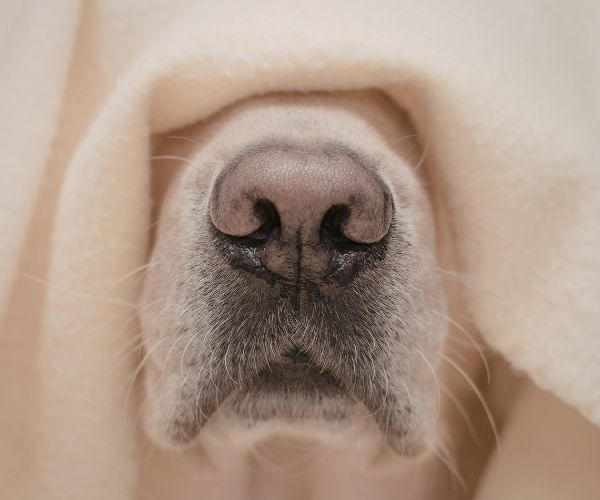
A dog’s nose texture is as unique as a human fingerprint — and it never changes. The pattern of ridges, furrows, and beads on a canine nose forms a biometric signature so distinct that it can identify an individual dog with near-perfect accuracy .
How it works:
Apps now allow owners to register a close-up photo of their dog’s nose using their smartphone camera. The AI analyzes the nose print pattern and creates a unique digital profile linked to the owner’s contact information. If the dog goes missing, a finder can scan the dog’s nose using the same app, and the AI matches it against the database — reuniting pet and owner without needing a collar, tag, or microchip reader .
Available Apps:
| App | Platform | Key Feature | Link |
|---|---|---|---|
| Petnow | iOS | Scans both dogs (nose print) AND cats (face core); 99% accuracy; CES 2022 Innovation Honoree | petnow.io/en |
| UBio PetID | iOS & Android | Nose print recognition + QR code issuance + lost pet reporting | App Store / Google Play |
| Nose Print Registration (NPR) | Android | Advanced image recognition technology from iSciLab Corporation | Google Play |
Key advantage: Unlike microchips, which require a special scanner found only at vets and shelters, nose-print recognition works with any smartphone. Anyone who finds your pet can scan, match, and contact you immediately .
Doorbell Camera Pet Identification: Your Neighborhood Watch
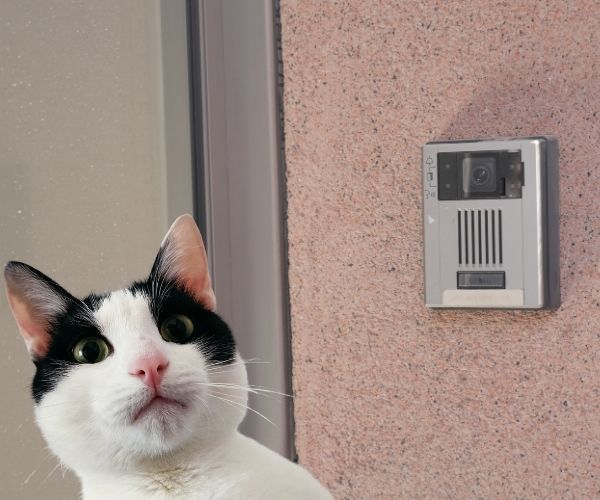
Smart doorbell cameras are now applying AI to help find lost pets — and one company has turned this into a formal feature.
Ring’s “Search Party” Feature
In September 2025, Ring (the Amazon-owned doorbell camera company) launched a feature called Search Party that uses AI to help families track down lost pets . Here is exactly how it works:
The Ring device owner receives a notification and can choose to share the video clip — opt-in only
A pet owner uploads a photo of their lost dog to the Ring app
Search Party scans nearby Ring cameras for any recent videos where an animal was detected
Ring’s AI compares the detected animal against the uploaded photo
If a match is found, the pet owner is alerted to the general location
Privacy safeguards Ring has put in place:
- No automatic video sharing — device owners must manually approve each share
- No access to live camera feeds — only saved cloud videos
- Ring employees cannot view your videos without explicit permission
- You can disable Search Party entirely in the Ring app’s Control Center
Note: Search Party is opt-out for basic scanning (meaning it is enabled by default), but opt-in for video sharing. You can disable it camera by camera if you prefer not to participate .
Other Smart Camera AI
Other brands are also building pet detection into their security cameras:
What about Google Lens?
While Google Lens can identify a dog’s breed from a photo, it cannot tell you whose dog it is or where it was found. Google does not support facial recognition for identifying specific individual animals due to privacy policies. Use Lens to identify a found pet’s breed, then upload that same photo to Petco Love Lost — because that platform will check shelter databases for a match.
Summary: Nose Prints vs. Doorbell Cameras
| Technology | Best For | Key Limitation | Get Started |
|---|---|---|---|
| Nose-print apps | Permanent, microchip-free identification | Requires finder to have the same app | Download Petnow, UBio PetID, or NPR today |
| Ring Search Party | Real-time neighborhood alerts | Only works within Ring’s ecosystem; requires cloud storage | Available in Ring app under “Neighbors” |
A Realistic 2-Hour Action Plan

You do not need to be a technologist. You need a protocol. If your pet goes missing, here is the order of operations.
First 5 minutes — Digital first response
- Find the best recent photo you have (face + full body).
- Upload to Petco Love Lost.
- Post to PawBoost.
- Share on Nextdoor with last seen location, pet name, and your phone number.
First 2 hours — Physical search
- Call every shelter within 10 miles. Do not rely on databases alone.
- Visit the shelter that serves your zip code in person. Many hold strays for only 3–5 days.
- Walk the neighborhood with a printed photo. Ask neighbors to check garages, sheds, under decks, and crawl spaces.
Ongoing — Optimize your AI matches
- Upload 3–4 different photos (different angles, different lighting).
- Confirm your microchip registration is current — AI tools cross-reference chip data.
- Update your listing every 48 hours. New sightings refresh the alert.
One thing most people forget: If you find a pet, upload a clear photo immediately. You may be holding someone’s family member without knowing it.
Why the Time Savings Actually Matters
In traditional lost-pet searches, the average reunion takes 8 to 12 days — if it happens at all. Shelters receive more found animals than they can manually match. Neighbors post to Facebook groups that owners never see. Owners drive to the same three shelters repeatedly because they have no better information.
AI compresses that timeline. With photo matching and automated alerts, reunions are increasingly happening within 48 hours.
For a lost dog or cat, two days versus twelve can mean the difference between staying local and wandering miles into unfamiliar territory. It can mean the difference between being found by a neighbor and being picked up by animal control in a different county.
That is not incremental improvement. That is a transformation.
Best Practices From People Who Have Done It
After reading hundreds of lost-and-found threads, a few patterns emerge.
If you lost a pet:
- Use a Google Voice number on public posts to avoid spam calls.
- Create a one-page PDF (photo + details) to hand to mail carriers, delivery drivers, and vet clinics.
- Set a daily calendar reminder to re-check AI matching platforms. New found pets are added constantly.
If you found a pet:
- Take a clear, well-lit photo before moving the animal.
- Upload to Petco Love Lost and PawBoost immediately.
- Have the pet scanned for a microchip at any vet or clinic (it is free).
- Do not post every detail online. Ask the person claiming the pet to describe markings. This prevents bad actors from claiming animals that are not theirs.
A Hopeful Future (That Is Already Arriving)
AI will continue to improve. Real-time video matching from doorbell cameras is on the horizon. Predictive models that estimate where a lost pet might travel based on breed, weather, and terrain are being tested. Integration with veterinary records will make matching even faster.
But here is what does not need to wait for the future: uploading a clear photo today. Keeping your microchip information current. Knowing which platforms to use before an emergency happens.
AI is not magic. It is a tool. And like any tool, it works best in prepared hands.
What You Can Do Right Now
You do not have to wait until a pet goes missing. Take two minutes today:
- Save these links somewhere easy to find:
- Petco Love Lost: petcolove.org/lost
- PawBoost: pawboost.com
- Nextdoor lost pet guide: help.nextdoor.com/s/article/Best-practices-Lost-pets
- Confirm your pet’s microchip registration is up to date. This takes less time than scrolling social media.
- Take a good current photo of your pet (face + full body) and store it in a folder called “Lost Pet Emergency.” You hope to never need it. But if you do, you will be grateful.
Lost pets come home faster when technology and community work together. AI handles the matching. Neighbors check the sheds. And you — you stay hopeful, persistent, and prepared.
Have you used an AI tool to find a lost pet? Or do you have a best practice that belongs on this list? Let me know in the responses.
Sources
- Petnow: petnow.io/en
- UBio PetID on App Store: apps.apple.com/tr/app/ubio-petid/id1622142110
- UBio PetID on Google Play: play.google.com/store/apps/details?id=kr.co.unioncomm.petid
- Nose Print Registration (NPR) on Google Play: play.google.com/store/apps/details?id=com.iscilab.snoutapp
- Yahoo Tech: Search Party Controversy: tech.yahoo.com/cybersecurity/articles/amazon-rings-search-party-feature-142500683.html
- NYPost: Ring Search Party Launch: nypost.com/2025/11/21/business/how-ring-went-from-the-depths-of-shark-tank-to-americas-largest-civilian-surveillance-network
- Eufy AI Features (Pet Detection): support.nz.eufy.com/support/solutions/articles/154000242984-ai-features-for-eufysecurity-devices
- The Verge: Ugreen SynCare Launch: theverge.com/tech/846789/ugree-syncare-indoor-outdoor-cameras-ai-doorbell
Leave a Reply